


Table of Contents
ToggleWordPress Multisite is a built-in feature that enables managing a network of multiple websites from a single WordPress installation. It is a go-to solution for multi-brand, multi-regional, or multilingual projects requiring centralized management, high scalability, and strict administrative control. This guide explores the Multisite architecture, its impact on SEO and security, and when it is the right choice for your business.
As a project grows and the number of sites increases, managing individual WordPress installations becomes an operational bottleneck. Redundant updates, fragmented security protocols, and mismatched plugin versions complicate maintenance and heighten technical risks.
At DITS.agency, we leverage Multisite for projects that demand centralized control without sacrificing flexibility. Each site within the network can have its own unique content, users, settings, language, and domain. This makes it a powerhouse for international brands, franchises, corporate branches, and agency-led solutions.
From an operational standpoint, Multisite addresses the critical needs of scalable infrastructure:
- Streamlines network management by centralizing the dashboard.
- Accelerates time-to-market for launching new sub-sites.
- Ensures global security by deploying updates from a single core.
- Maintains architectural integrity through unified technical standards.
With the rise of multi-brand digital ecosystems and more stringent requirements for SEO architecture and stability, WordPress Multisite has never been more relevant. Its adoption by giants like WordPress.com, educational institutions, and global corporations proves it is a mature, high-performance solution for enterprise-level needs.

The Meaning of WordPress Multisite: A Simplified Overview
In simple terms, WordPress Multisite allows you to manage multiple websites as a single, unified system. Instead of maintaining numerous individual WordPress installations, you use a shared platform where all network sites are created and maintained within one core.
While each site remains a distinct entity with its own pages, media library, users, and settings, the technical heavy lifting – such as core, plugin, and theme updates – is handled centralized. This significantly reduces the operational burden on your team and ensures that maintenance remains predictable and scalable as your project grows.
One of the key strengths of Multisite is its ability to preserve site autonomy. Content is never mixed between sites; each can evolve independently while remaining under a unified technical umbrella. The architecture introduces a Network Administrator (Super Admin) who oversees the entire ecosystem, while Site Administrators focus exclusively on their specific projects.
From the DITS.agency perspective, WordPress Multisite is the most pragmatic solution for managing multiple web properties. It offers a systemic, controlled approach to management without the overhead of excessive technical complexity.
You can read also Planyo Integration Services: Booking System Setup, API Integration & Custom Development
The Technical Inner Workings of WordPress Multisite
The Unified Multisite Architecture
From a technical perspective, WordPress Multisite is a single WordPress installation that powers multiple websites simultaneously. The system is installed on the server once, after which a network of sites is created, all running on the same underlying WordPress engine.
At DITS.agency, this approach significantly streamlines project maintenance: instead of managing several detached systems, we work with a unified technical foundation featuring a single WordPress core and centralized management.
The Database: Single Engine, Logically Partitioned
Multisite utilizes a single database, yet site data never overlaps. For every site in the network, WordPress automatically generates its own set of tables with distinct prefixes.
This architectural design ensures that:
- Data Isolation: Each site stores its own pages, posts, and settings separately.
- Logical Segregation: Data remains isolated at the logical level.
- Centralized Efficiency: Management stays centralized without sacrificing structural integrity.
This is a critical factor we always account for when architecting Multisite solutions to ensure long-term stability and performance.
Files and Media Assets
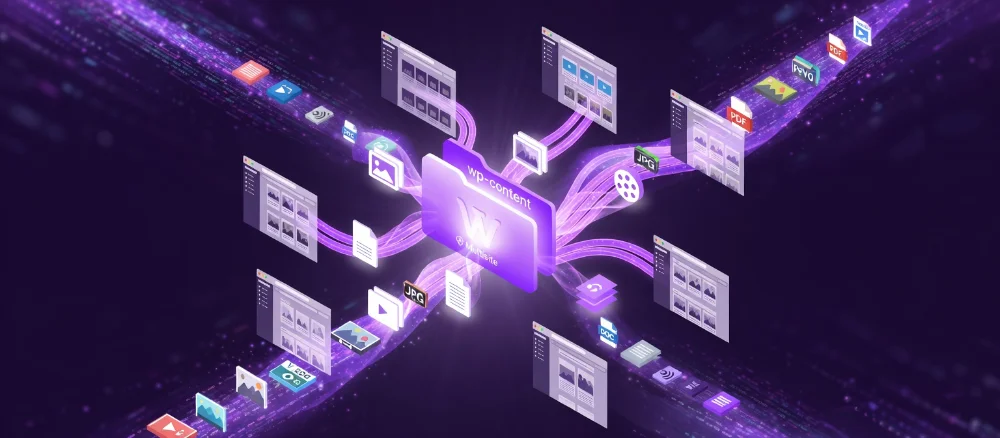
The file structure in a Multisite network is also centralized. A shared wp-content folder is used, within which WordPress automatically partitions media files for each specific site in the network.
For editors and business owners, the experience is identical to a standard WordPress setup – there is no need to navigate the underlying folder hierarchy. The technical complexity is entirely abstracted at the system level.
Network Admin and User Roles
Managing a Multisite network occurs through a dedicated administrative tier: the Network Admin. In this environment, user roles are strictly segmented:
- Super Admin: Oversees the entire network. They have the authority to install plugins and themes, configure global system parameters, and provision new sites.
- Site Administrators: Manage only their assigned site and do not have access to network-wide configurations.
In our practice at DITS.agency, this model significantly mitigates risks, preventing localized changes from accidentally impacting the entire ecosystem.
Differentiating Network vs. Local Settings
A key to mastering Multisite is understanding the distinction between:
- Network Settings: Core files, global plugins, and overarching system logic.
- Site-Specific Settings: Content, visual design, and local parameters.
This separation maintains system-wide order and allows projects to scale seamlessly without losing administrative control.
Provisioning New Sites
Creating a new site within a Multisite network takes only a matter of minutes. The Network Administrator simply defines the address or domain and selects the core parameters; WordPress then automatically deploys the site within the existing system.
There is no need to reinstall WordPress, copy files, or configure the infrastructure from scratch. This efficiency is precisely what makes Multisite the go-to solution for rapidly scalable projects.
How WordPress Processes Requests
When a user visits a site, WordPress identifies which specific site in the network the request belongs to based on the domain or URL structure. The system then dynamically loads the corresponding content and configurations for that specific instance.
For the end visitor, the experience is indistinguishable from a standard, standalone WordPress site, even though it is technically part of a larger, interconnected network.
Types of WordPress Multisite and How to Choose the Right Model
WordPress Multisite can be implemented using various architectural models. The choice of a specific model directly impacts management efficiency, SEO logic, and how easily the project will scale in the future. In practice, the differences between these models come down to how site addresses are structured within the network.
At DITS.agency, our approach to selecting a Multisite architecture always begins with an analysis of the project’s objectives rather than technical preferences. Below are the primary configurations used in professional deployments.
Subdomain-Based Multisite
In this model, each site is assigned its own subdomain, for example:
- site1.example.com
- site2.example.com
This approach is frequently used when sites are interconnected but need to appear as distinct, standalone projects.
Key considerations:
- Technical Setup: Requires proper DNS configuration (typically via a wildcard subdomain).
- SEO Perspective: Google often treats subdomains as separate entities.
- Authority: Each site is indexed and ranked independently, meaning they do not automatically “inherit” the main domain’s SEO equity.
In our experience, this model is an excellent fit for diverse product lines, specific service divisions, or distinct functional blocks within a single brand ecosystem.

Subdirectory-Based Multisite (Subfolders)
In this configuration, sites are nested within the main domain, for example:
- example.com/site1
This structure is commonly used for content-driven projects, blogs, media platforms, or internal corporate divisions.
Advantages and Limitations:
- Domain Unity: Sites technically reside within a single domain.
- SEO Equity: Authority and “link juice” typically distribute more efficiently across the subfolders.
- Contextual Fit: This model is less effective if the sites cover vastly different topics or target entirely different markets.
At DITS.agency, we typically recommend a subdirectory structure for projects sharing a cohesive content strategy and a unified SEO logic.
Multisite with Domain Mapping
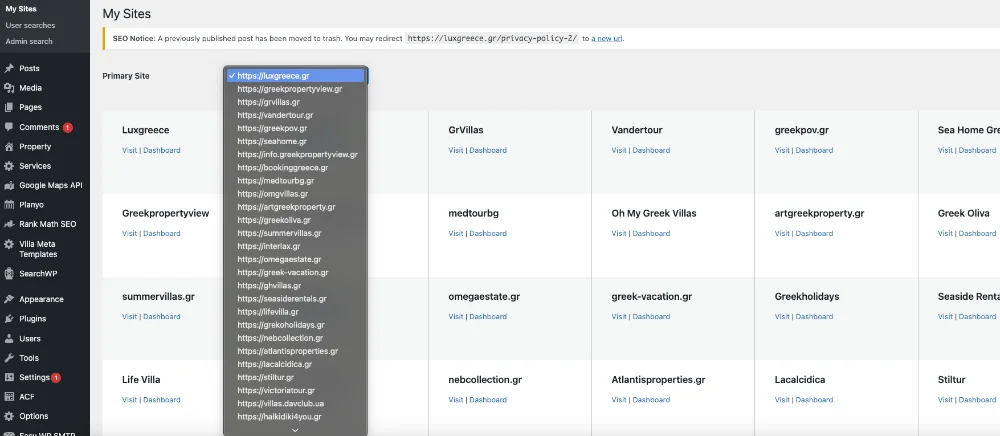
The most flexible option is Multisite utilizing dedicated domains. Each site operates on its own top-level domain, such as:
- example.com, example.es, example.de
Despite having unique domains, they are all managed from a single WordPress installation. To the end-user, these sites appear completely independent, while remaining part of a unified network for the administrator.
Why this is a preferred choice:
- International & Local Reach: Ideal for global brands and multi-regional platforms.
- Uncompromised SEO: Allows for building full-scale local SEO strategies for each region.
- Centralized Oversight: Maintains high-level management and control.
In the practice of DITS.agency, domain mapping is the most frequent choice for international brands and complex multi-regional ecosystems.
Hybrid Models
For complex projects, a mixed approach is sometimes implemented. For instance:
- The primary corporate site operates on the root domain.
- Regional branches or product lines reside on subdomains or mapped standalone domains.
While these solutions require meticulous architectural planning, they allow WordPress Multisite to be precisely tailored to specific business objectives.
How to Choose the Right Model
The selection of a Multisite architecture is always driven by the specific objectives of the project:
- Franchises and Branch Networks leverage Multisite to maintain brand consistency while allowing for localized content management.
- Educational Platforms and Universities utilize the system to host individual faculty or department sites within a single, unified ecosystem.
- Digital Agencies deploy Multisite for rapid site provisioning and the centralized maintenance of multiple client assets.
- SaaS Projects and Marketing Platforms rely on Multisite to automate the creation of user-facing websites at scale.
- Multi-brand Enterprises choose Multisite to keep diverse brands or digital storefronts under strict technical oversight.
From the perspective of DITS.agency experts, the “correct” Multisite model isn’t necessarily the one that is easiest to configure. It is the one that logically aligns with your business structure, supports your SEO strategy, and accommodates your long-term growth roadmap.
Our Expertise: WordPress Multisite in Action
At DITS.agency, we deploy WordPress Multisite for production-grade environments where centralized management, high scalability, and architectural integrity are non-negotiable. Here is how we’ve applied this technology to solve real business challenges.
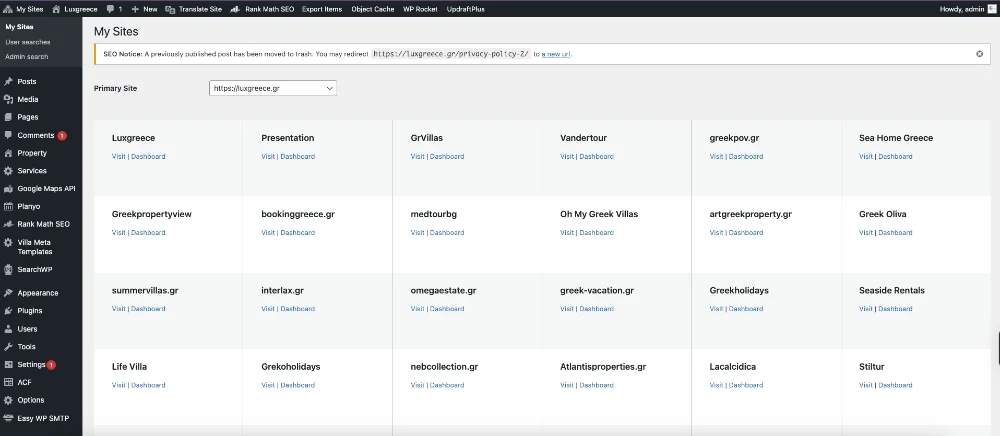
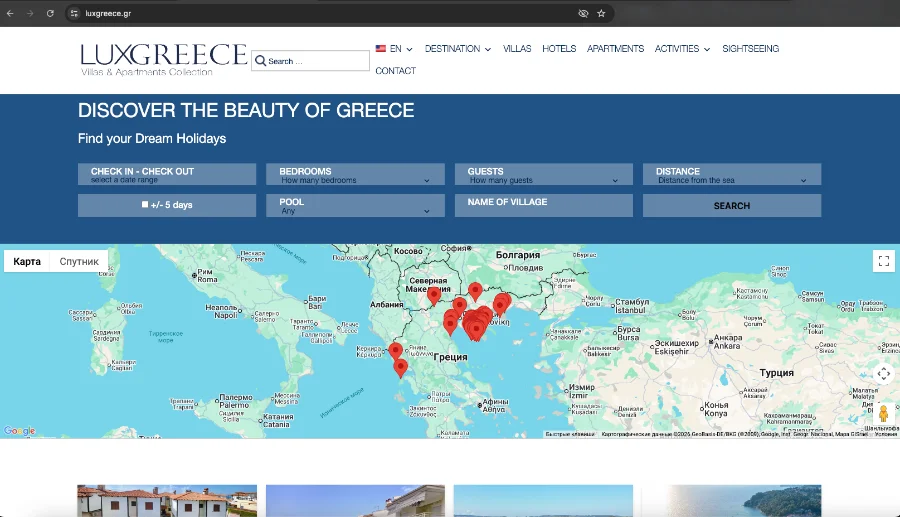
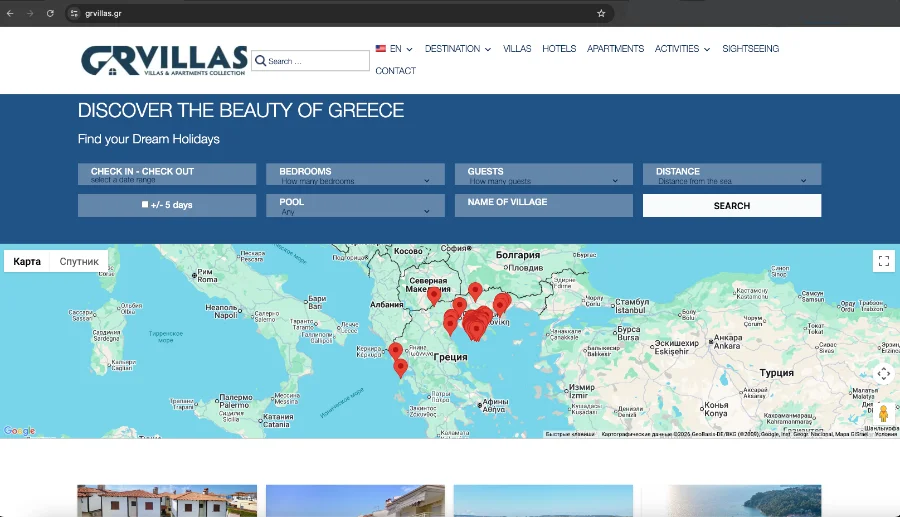
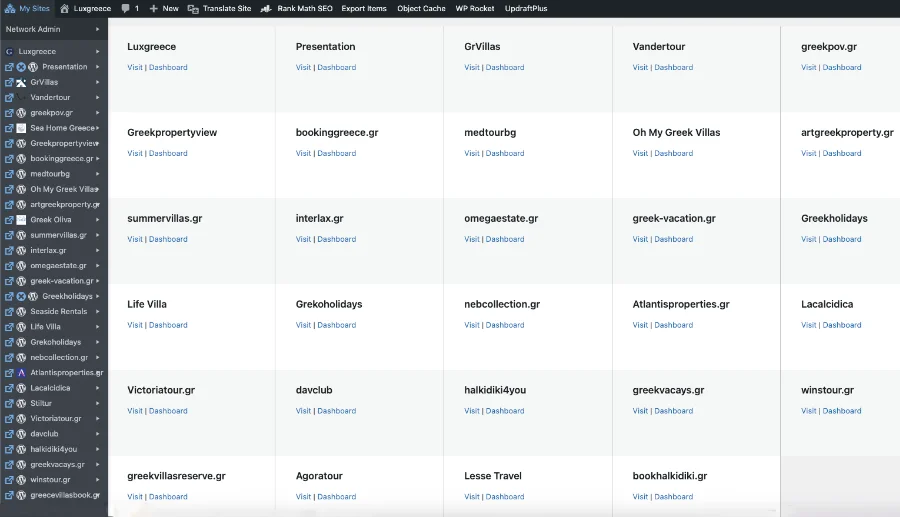
Case Study: luxgreece.gr – Real Estate & Hospitality
A premier platform requiring seamless management of diverse property types and locations within a single ecosystem. The project demanded a unified design language and centralized updates without infrastructure duplication.
- The Strategy: We implemented a Domain Mapping structure. This allowed each site to operate on its own unique domain, ensuring they weren’t strictly “tethered” to the main site in the eyes of the consumer.
- The Result: Complete personalization for every sub-site. Each entity stands as a unique, independent player in the competitive Greek real estate market while remaining under one technical roof.
- Custom Solutions: We developed bespoke tools for automated content duplication, allowing property listings to be synchronized across the network in a predefined sequence, alongside specialized Multisite-compatible plugins.
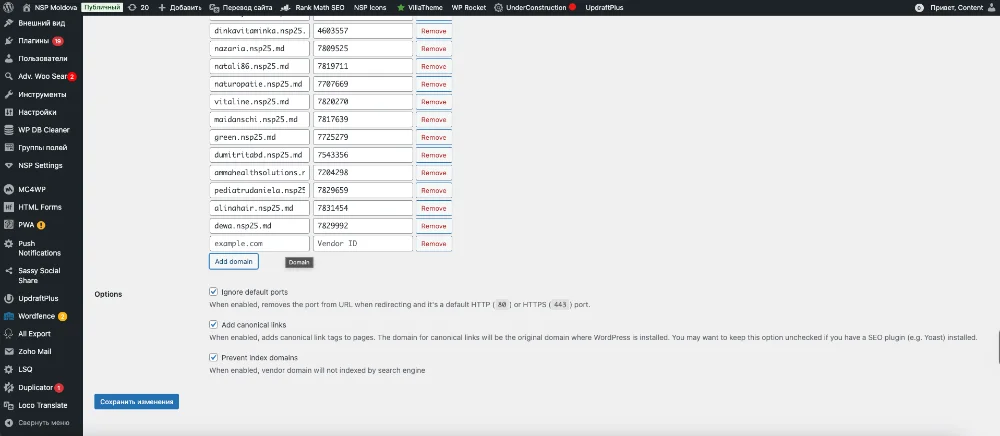
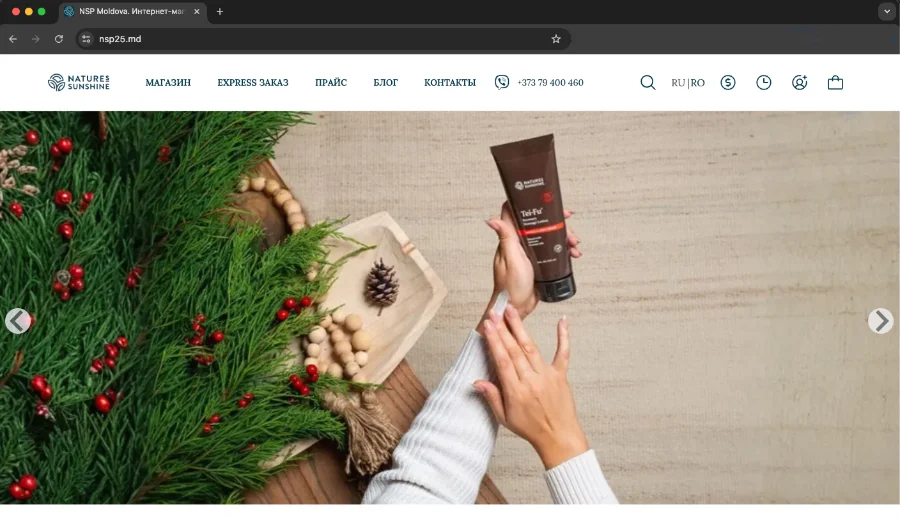
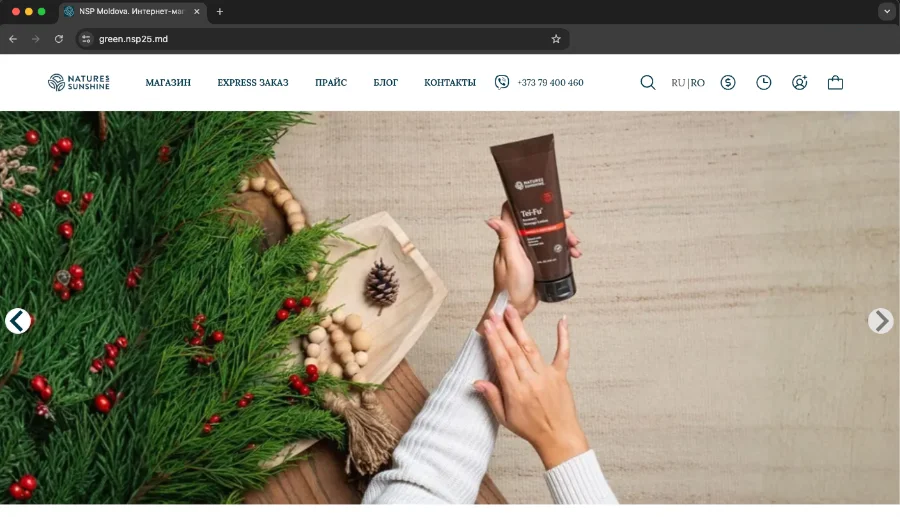
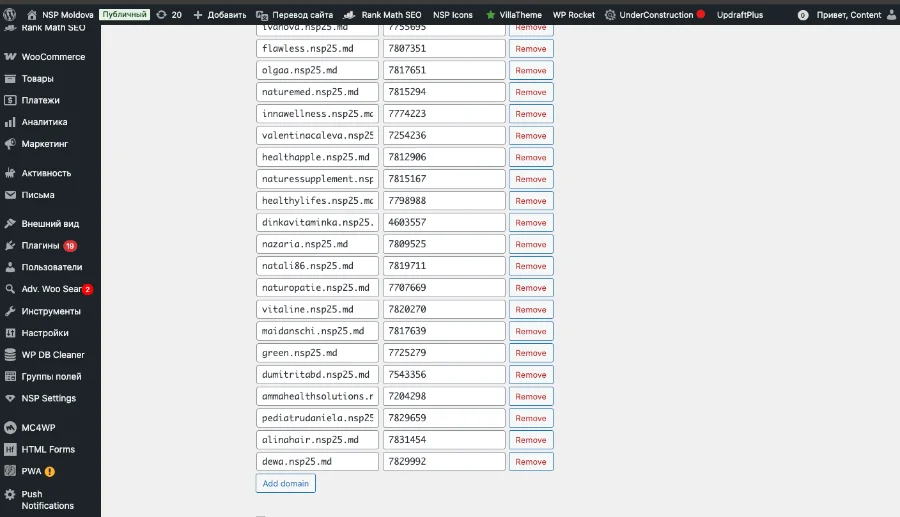
Case Study: nsp25.md – Scalable Agent Network
For nsp25.md, we utilized a Multisite-style architecture to maintain granular user role management and a unified technical core during rapid expansion.
- The Strategy: We built a system where each agent received a dedicated site with a unique ID.
- The Innovation: We engineered a custom solution for real-time inventory synchronization. Product stock levels and warehouse data remain consistent across the entire network.
- Personalization: Each agent site supports independent order processing. Furthermore, the system dynamically adjusts pricing, displaying discounted rates specifically for registered buyers.
In both instances, the choice of Multisite was a strategic decision made after rigorous technical and SEO audits. At DITS.agency, we don’t treat Multisite as a “default” setting; we treat it as an architectural powerhouse designed for long-term scalability and operational efficiency.
Typical Use Cases for WordPress Multisite
WordPress Multisite is the gold standard for projects that evolve from a single website into a cluster of interconnected digital properties. Instead of maintaining each installation in isolation, multisite consolidates them into a unified system for centralised management.
Below are the primary scenarios where the Multisite architecture delivers the highest efficiency.
1. Multi-Brand and Branch Management
This is one of the most common applications for companies operating across multiple sectors, product lines, or regions.
- The Model: A core brand identity with a shared technical structure.
- The Benefit: Each sub-site addresses specific local or product-related goals, while content is managed independently.
- The Result: Consistent design and corporate standards without stifling the growth of individual entities.
2. Blog Networks and Media Communities
Multisite is frequently deployed for:
- Large-scale media outlets and news portals.
- Platforms hosting user-generated blogs.
- Multi-departmental corporate blogs. New sites can be launched instantly, while security protocols, styling, and updates remain under centralized control.
3. Educational Institutions and Universities
Higher education organizations and e-learning platforms rely on Multisite to power:
- Individual faculty and department websites.
- Specific course or training program pages.
- Internal research projects and student initiatives. Centralized management significantly reduces the workload on IT departments and simplifies the maintenance of hundreds of sub-sites.
4. Franchises and Multi-Location Businesses
For franchise models, Multisite is a strategic asset:
- Each branch or franchisee receives its own dedicated site.
- Brand integrity and structural consistency are strictly maintained.
- Local content management remains autonomous. This approach streamlines network expansion and ensures high-level quality control across all brand touchpoints.
5. Enterprise Corporate Networks
Large-scale corporations utilize Multisite for:
- A mix of internal (Intranet) and external-facing projects.
- Subsidiary and regional office websites.
- Department-specific portals. By maintaining a single technical standard, the company simplifies the long-term support and evolution of its digital infrastructure.
6. SaaS Solutions and Marketing Platforms
Many WordPress-based SaaS products and marketing tools use Multisite as their core engine to handle:
- Automated Provisioning: Instant site creation for new customers.
- White-Label Solutions: Customizable branding for sub-sites.
- Client Control Panels: Scalable management without the overhead of individual WordPress installations.
7. Digital Agencies and Dev Studios
For agencies, Multisite serves as a high-velocity scaling tool:
- Rapid deployment of new client projects.
- Bulk updates for plugins and themes across the entire portfolio.
- Simplified technical support for dozens of sites from a single dashboard.

Advantages and Limitations of WordPress Multisite
Before selecting WordPress Multisite as your project’s architecture, it is crucial to conduct a realistic assessment of its strengths and weaknesses. While this solution can drastically simplify management and scaling, misapplication can lead to unnecessary technical debt. At DITS.agency, we encounter both scenarios regularly. Below is a perspective on Multisite based on real-world operations rather than theoretical idealism.
The Advantages of WordPress Multisite
The primary driver behind WordPress Multisite is centralized management. Instead of juggling dozens of separate admin dashboards, you operate within a single system that controls the entire network. In our experience at DITS.agency, this is often the deciding factor for multi-site projects.
Centralized Maintenance and Security
Because Multisite runs on a single installation, the WordPress core, plugins, and themes are installed and updated from one central hub. This streamlines maintenance and bolsters security, ensuring every site in the network runs on identical versions and standardized tools.
Resource and Infrastructure Efficiency
A shared architecture minimizes resource consumption and simplifies your infrastructure. For production projects, this translates to fewer redundant configurations, streamlined backup processes, and more predictable hosting expenditures.
Key Strategic Benefits:
- Unified Network Oversight: Total control over all web properties from a single dashboard.
- Single-Core Infrastructure: One WordPress installation for global updates and patches.
- Optimized Hosting Costs: Significant savings on server resources compared to standalone installations.
- Granular User Governance: Simplified management of roles and permissions across the network.
- Standardized Brand Integrity: Enforced design patterns and structural consistency.
- Operational Time Savings: Drastic reduction in administrative overhead.
Furthermore, Multisite allows for a unified security and disaster recovery strategy. For DITS.agency clients, this means faster response times to critical updates and a significant reduction in risks associated with human error.
Also you can read: Sage 10 + Bedrock: The Modern WordPress Stack for Developers
Limitations and Drawbacks of WordPress Multisite
Despite its advantages, WordPress Multisite is not a one-size-fits-all solution. In our practice, we have found that Multisite demands a much more meticulous approach to architecture and ongoing operations.
Initial Complexity and Planning Multisite isn’t something you simply “toggle on.” It requires expert engineering from day one, particularly concerning SEO strategy, domain mapping, and future scaling roadmaps.
Plugin Compatibility A major technical hurdle is plugin compatibility. Not all plugins are designed to function correctly in a shared environment – especially those built exclusively for standalone sites. This becomes a critical factor in projects involving e-commerce, membership portals, or complex third-party integrations.
Performance and Infrastructure Reliability
Because all sites operate within a single system, a performance bottleneck or a technical error on one site can potentially impact the entire network – a “single point of failure” risk. Consequently, Multisite necessitates a robust approach to hosting, advanced caching, and proactive monitoring.
Key Constraints to Consider:
- Steeper Learning Curve: More complex initial configuration and management.
- Plugin Friction: Limited compatibility with certain popular plugins.
- High Infrastructure Demands: Requires enterprise-grade servers and optimized environments.
- Shared Security Risks: A vulnerability in the core or a global plugin affects the whole network.
- Customization Ceilings: Restrictions on how much an individual site can deviate from the network’s technical standards.
- Migration Hurdles: Moving a site into or out of a Multisite network is a complex technical process.
- Database Bloat: Since all data is housed in a single database, the file size can grow exponentially, complicating backups and database queries.
- SEO Pitfalls: High risk of search engine penalties if the architecture is misconfigured.
At DITS.agency, we often see issues arise when Multisite is chosen “just in case” without a defined long-term strategy. In those instances, standalone WordPress installations often prove to be simpler and more reliable.
WordPress Multisite is not a universal fix; it is a specialized tool for specific objectives. From the DITS.agency perspective, it is the perfect fit for projects prioritizing centralized control and scalability, but it demands architectural discipline. When evaluating Multisite, it is vital to weigh the long-term operational constraints against the immediate administrative benefits.

Practical SEO in a WordPress Multisite Environment
While WordPress Multisite is a powerful tool for network management, it requires meticulous attention to detail from an SEO perspective. The primary challenge lies in balancing centralized control with the need to position each sub-site as a distinct, independent entity in the eyes of search engines.
The Risks of Duplicate Content
Internal competition and content duplication are the greatest threats to a Multisite network. Sharing themes and functional blocks often leads to the unintentional replication of text. Search engines like Google are highly sensitive to repetitive content within a single network.
- Content Uniqueness: Product descriptions, articles, and FAQs must be tailored to the specifics of each individual site.
- Canonical Integrity: It is vital to configure rel=”canonical” tags to point to the relevant page within the current sub-site, preventing “authority leakage” to the network’s root domain.
- Template Adaptation: While shared templates are efficient, text in global areas (Footers, Sidebars, “About Us” sections) should be customized for each instance.
Indexing: Robots.txt and Sitemaps
Search engines should treat every sub-site as an autonomous asset. A common configuration error is using a single robots.txt file that imposes global restrictions on the entire network.
Best practices for professional setups:
- Autonomous Sitemaps: Each site must generate its own sitemap.xml with its specific URLs.
- Isolated Indexing Rules: Individual robots.txt rules ensure that technical directives for one project do not inadvertently block the indexing of another.
Semantic Strategy and Keyword Cannibalization
Multisite projects often suffer from Keyword Cannibalization – where multiple sites within your own network compete for the same search queries. This dilutes link equity and hinders ranking potential.
To avoid this, we implement a strict semantic separation based on:
- Geography: Distinct countries or cities.
- User Intent: Segregating informational, commercial, or niche-specific resources.
- Product Segmentation: Dividing by business lines or service categories.
Local SEO and Franchises
For multi-location businesses, Multisite is the industry standard, but success hinges on “local uniqueness.” To dominate local search results, you must implement:
- Unique, geo-targeted keywords for each branch.
- Direct mapping of each sub-site to its specific Google Business Profile.
- Localized contact pages with unique NAP (Name, Address, Phone) data.
Impact on Domain Authority
The architecture you choose dictates how authority is shared. Subdirectories (example.com/site/) inherit the main domain’s authority faster. In contrast, Subdomains (site.example.com) are viewed as more independent entities and typically require a longer “warm-up” period to build trust.
Internal linking within the network must remain organic. Excessive cross-linking between network sites can be flagged as manipulative, carrying the risk of search engine penalties.
International SEO Advantages
For multilingual platforms, Multisite often outperforms standard translation plugins. This architecture enables:
- A clean, unique URL structure for every target market.
- Precision hreflang implementation without code bloat.
- Market expansion without compromising the performance of the core database.
WordPress Multisite and SEO only work effectively when built on a pre-planned architectural foundation. When executed correctly, the system provides a level of flexibility and control that is impossible to achieve with fragmented, standalone websites.

Hosting and Scaling WordPress Multisite: The Infrastructure Foundation
The Critical Role of Hosting in Multisite Architecture
In a WordPress Multisite environment, hosting transitions from a mere “storage service” to a strategic infrastructure component. Because all sites in the network share a single core, a common database, and identical PHP processes, any traffic spike or critical error on one node will inevitably cascade across the entire network.
The experience of the DITS.agency team shows that underestimating hardware requirements during the design phase is the leading cause of performance degradation in Multisite projects. Infrastructure must be scaled proactively, based on the cumulative projected traffic of the entire network.
Also you can read: WordPress vs HTML Website: Which Is Better for Your Business in 2026?
Resource Intensity: CPU and RAM Benchmarks
Multisite demands a significantly higher resource overhead compared to isolated installations. The primary load stems from processing concurrent PHP requests and database queries from multiple active sites simultaneously.
A resource deficit in such networks immediately leads to:
- Increased Time to First Byte (TTFB): Slow server response times.
- WP-Cron Failures: Disruptions in background tasks and scheduled actions.
- Admin Dashboard Latency: Lagging backend performance that hinders content management.
When implementing projects at dits.agency, we always factor in a resource redundancy coefficient (overhead) to ensure seamless operation even during peak simultaneous activity across all network segments.
CDN as a High-Availability Component
For distributed networks and international projects, a Content Delivery Network (CDN) is a baseline technical requirement. It is not just an acceleration tool but a vital mechanism for offloading the upstream (origin) server.
The Role of a CDN in Multisite:
- Static Asset Optimization: Offloading the server by caching media content on edge nodes.
- Geographical Accessibility: Minimizing latency for international audiences.
- Traffic Spike Protection: Effectively dampening the impact of sudden load surges.
Multi-Level Caching Strategy
In a Multisite setup, caching is a mandatory architectural layer. Without it, scaling a network to dozens or hundreds of sites is technically unfeasible.
We implement a comprehensive caching stack:
- Object Cache (Redis/Memcached): To reduce database load by storing the results of repetitive queries.
- Page Caching: At the server level (Nginx FastCGI or Varnish) for instantaneous content delivery.
- Edge Caching: At the CDN level to minimize requests reaching the origin server.
Before launching large-scale networks, DITS.agency specialists conduct rigorous load testing to verify the fault tolerance of the selected configuration.
Selecting the Infrastructure Solution
The type of hosting you choose defines the ultimate scalability limit of your network:
| Hosting Type | Suitability for Multisite | Expert Evaluation |
|---|---|---|
| Shared | Not Recommended | Suitable only for static micro-networks. Severe resource constraints make it unfit for professional business use. |
| VPS / VDS | Entry-Level | Optimal for mid-sized projects. Provides necessary control over server configurations and dedicated resource allocation. |
| Cloud / Managed | Recommended Choice | High availability and dynamic scaling. Ideal for growing networks with volatile traffic patterns. |
WordPress Multisite and WooCommerce: A Strategic E-commerce Scaling Roadmap
Combining WordPress Multisite with WooCommerce is a formidable, albeit specialized, architecture. It is far more than just “multiple stores in one dashboard”; it is a sophisticated ecosystem that demands a profound understanding of data architecture.
At DITS.agency, we view this synergy not as a generic tool, but as a precision-engineered solution for businesses that prioritize centralized oversight without sacrificing departmental autonomy.
How the Architecture Operates
In a Multisite environment, each storefront functions as an independent operational unit. There is no native “global storefront” – and for large organizations, this is its primary value.
- Data Autonomy: Each site maintains its own unique products, orders, and customer databases. This ensures that the operational workflows of one regional office or franchisee never conflict with another.
- Flexible Localization: You can configure site-specific payment gateways, tax rules, and shipping logic for every store in the network while maintaining a unified codebase.
DITS.agency Insight: We recommend this approach for brands requiring legal and financial separation between branches while maintaining a cohesive visual identity.
The Challenges: Global Catalog and Syncing
The most frequent request we receive is to create a “shared warehouse” for the entire network. Standard WooCommerce does not support this functionality out-of-the-box. Furthermore, third-party synchronization plugins often bloat the database, posing significant risks to system performance.
The DITS.agency development team addressed this challenge by engineering a custom architecture for cross-network synchronization. Our solutions efficiently unify inventory levels and stock data across the entire Multisite network. We successfully implemented this approach in the projects mentioned above, ensuring data integrity and stability across all platforms simultaneously.
Security and Update Governance
In a Multisite setup, a single faulty plugin can halt sales across every storefront. Therefore, managing WooCommerce extensions in network mode requires a rigorous protocol.
- Selective Activation: We advise against “Network Activation” for resource-heavy plugins. Each extension should be activated only where it is functionally required.
- Staging as a Standard: At DITS.agency, all updates undergo automated testing in an isolated staging environment. This is the only way to guarantee that a checkout update in one store won’t break the cart functionality in another.
When is Multisite + WooCommerce the Right Choice?
To help you decide if this architecture fits your business model, we’ve summarized the ideal use cases and the “red flags” where standalone installations might be better.
| Ideal Fit | When to Avoid |
|---|---|
| Franchising: Unified design and functional standards across all partners. | Unrelated Brands: If stores share no common logic and require entirely different plugin sets. |
| B2B Portals: Rapid deployment of standardized storefronts for dealers or distributors. | High-Load Marketplaces: Where a global “universal cart” or cross-site checkout is required. |
| International Expansion: Perfect for launching localized storefronts under a single master brand. | Deep Customization: When each store needs to evolve on its own unique technical path. |

Plugins in a Multisite Environment: Security and Compatibility
In a Multisite architecture, plugins require rigorous oversight, as any coding flaw is automatically scaled across the entire network. The primary challenge is that many extensions were never engineered for network-wide deployment; they may globally override settings or fail to segregate data correctly between individual sites. Generally, tools for SEO, security, and caching are well-adapted for Multisite, allowing for granular control over each resource. However, systems for e-commerce, memberships, and advanced role management often fall into a “high-risk” category. Due to the shared user database in Multisite, these types of plugins frequently trigger permission conflicts or payment processing errors. At DITS.agency, we follow a core principle: fewer plugins, higher resilience. Rather than installing bloated modules not designed for network logic, we often implement custom-coded solutions. This prevents database bloat and ensures that an update to a single component won’t paralyze the entire network. Every new tool in our projects undergoes mandatory testing in a staging environment – the only reliable way to guarantee business stability during rapid scaling.Conclusion
WordPress Multisite is not a universal “one-size-fits-all” solution, nor is it a mandatory upgrade for every growing project. It excels in environments that demand centralized management, unified architecture, and high scalability. However, in the wrong context, Multisite can overcomplicate development and heighten operational risks. From the perspective of DITS.agency experts, the transition to Multisite must always be a conscious architectural decision – one rooted in specific business objectives, SEO strategy, and technical support capabilities. When these criteria are not met, maintaining standalone WordPress installations often proves to be the more reliable and flexible path.Frequently Asked Questions About WordPress Multisite (FAQ)
General Overview
What is WordPress Multisite?
WordPress Multisite is a built-in feature that allows you to manage multiple websites from a single WordPress installation, sharing the same core files, plugins, and themes.
What is WordPress Multisite used for?
It is used for the centralized management of a network of sites, such as multiple brands, regional branches, language versions, franchises, or client portfolios.
When should I use WordPress Multisite?
Multisite is ideal when your websites are logically connected, require unified standards, and benefit from centralized administration.
Which is better: Multisite or multiple standalone sites?
Multisite is superior for interconnected projects with a shared architecture. Standalone sites are better for completely independent projects with divergent logic and SEO strategies.
Does WordPress Multisite use a single database?
Yes. Multisite uses one database, but each site stores its data in separate tables using its own unique prefix.
How many sites can I create in WordPress Multisite?
Technically, there is no limit. The actual number of sites is only constrained by your server resources and infrastructure quality.
Can I use different themes in a Multisite network?
Yes. Themes are installed globally by the Super Admin but can be activated individually for each specific site.
Can I use different PHP versions for sites within the same Multisite?
No. All sites in the network run on the same PHP version defined at the server level.
SEO & Marketing
Is WordPress Multisite good for SEO?
Yes, provided the architecture is planned correctly. It works exceptionally well if domains, content, and semantics are professionally configured.
Are there SEO risks in Multisite?
Yes. The primary risks include content duplication, keyword cannibalization, and incorrect hreflang implementation.
Can I connect separate Google Analytics for each site?
Yes. Every site in the network can have its own independent Google Analytics (GA4) and Google Search Console properties.
WooCommerce & E-commerce
Does WooCommerce work with WordPress Multisite?
Yes. WooCommerce is fully compatible, but by default, each site acts as an independent store with its own products, orders, and customer base.
Is Multisite suitable for online stores?
It is an excellent fit for store networks sharing a common business logic. It is not recommended for unrelated e-commerce projects.
Can I create a global product catalog in Multisite?
Not natively. A shared catalog requires custom development or specialized third-party solutions.
Management & Administration
Can I delete a single site from the network?
Yes. You can delete an individual site without affecting the rest of the network.
Can I migrate a site from Multisite to a standalone WordPress installation?
Yes, but it is more complex than a standard migration and requires careful handling of the database and SEO settings.
Can I convert a Multisite back to a single WordPress site?
Yes, but it is a non-trivial operation. Usually, it is more efficient to migrate the required sites individually.
How do I create a WordPress Multisite?
Multisite is enabled through WordPress configuration files and the Network Admin dashboard. Setup requires a deep understanding of architecture and hosting.
Can I set up Multisite on a local server?
Yes. Multisite can be deployed on a localhost environment for development and testing purposes.
How does WordPress Multisite work technically?
WordPress identifies the specific site based on the domain or URL structure and then dynamically loads the corresponding tables and settings from the unified system.
Do I need technical support for Multisite?
Yes. Multisite requires regular updates, proactive monitoring, and strict security oversight.
When should I avoid using WordPress Multisite?
If your project consists of only one site, has no plans for scaling, or lacks a dedicated technical team to support a network.