


Table of Contents
ToggleEven the best product pages won’t rank well if Google can’t easily discover them or understand how they fit into your website.
This is one of the most common SEO issues we see on WooCommerce, Shopify, and other eCommerce platforms. Stores invest heavily in content creation and link building, but their internal linking structure receives little attention. As a result, important categories and products often remain underperforming despite having high-quality content.
An effective internal linking strategy helps search engines crawl your store more efficiently, strengthens topical relevance, distributes authority to priority pages, and guides visitors toward the products they’re most likely to buy.
In this article, we’ll show how internal linking influences eCommerce SEO and share practical techniques that can improve rankings, organic visibility, and conversions.
What Is Internal Linking and Why Does Your Store Need It?
At its simplest, internal linking is the art of connecting the dots across your website. In the world of eCommerce, this means creating a logical web of paths – whether you’re linking a high-level category to a specific product, suggesting “related items” on a checkout page, or pointing a blog reader toward a curated buying guide.
Why should it be at the top of your priority list?
- Sharing the "SEO Juice": It’s the most effective way to funnel authority from your heavy hitters (like the homepage) down to your deep product pages, giving them the boost they need to rank.
- Getting Indexed, Faster: Search engines don't have infinite time. Clear internal paths act like an express lane, helping bots discover and index your new arrivals or updated collections almost instantly.
- Context is Everything: By using descriptive anchor text, you aren't just linking pages; you're telling Google exactly what those pages are about, reinforcing your most important keywords.
- The Perfect Shopping Trip: Beyond SEO, it’s about the customer. A smart linking strategy removes friction, guiding shoppers naturally to the products they want and increasing the chances of a "Add to Cart" moment.
The 4 Essential Internal Links for Your eCommerce Strategy
Internal links in an online store aren’t just “technical connections.” They are the digital signage that helps Google map out your business and guides your customers toward the “Buy” button.
Here is how to structure the four vital link types:
1. Category Links: The Foundation
Think of these as the main aisles of your store. They bridge the gap between your homepage, subcategories, and individual product pages. When done right, they create a logical hierarchy that tells search engines exactly which topics you’re an authority on, while making it effortless for shoppers to narrow down their search.
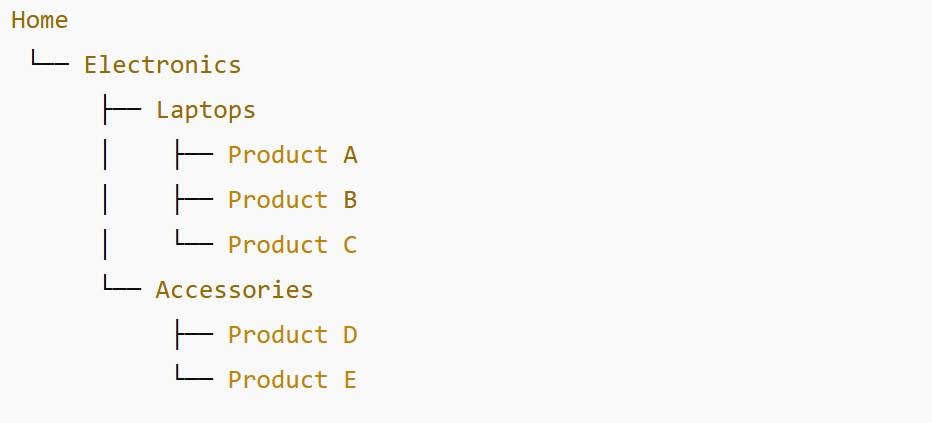
The Goal: To build a crystal-clear site hierarchy and act as a funnel, passing “ranking power” from your high-traffic top-level pages down to the deeper, specific corners of your catalog.
2. Product Links: The Virtual Sales Assistant
Product-to-product links are essentially your smartest salesperson on the floor. By connecting a specific item to similar, complementary, or alternative products, you aren’t just helping SEO – you’re actively cross-selling.
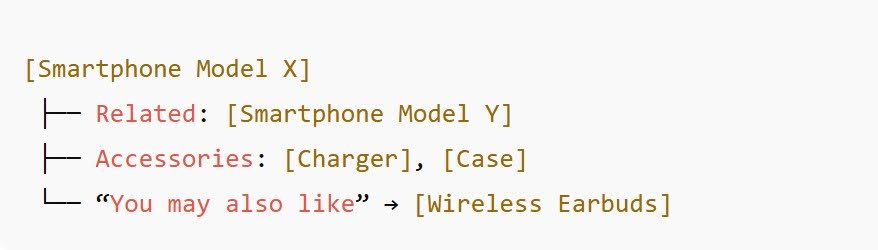
The Goal: To keep customers engaged by showing them the “perfect match” (complementary) or a “better fit” (alternatives), while simultaneously building a dense web of links that tells Google these products are all relevant to one another.
3. Navigational Links: The GPS of Your Store
Navigational links – your main menus, sidebar filters, and breadcrumbs – are more than just “buttons.” They act as the GPS for your site. Without them, users feel lost, and search engine crawlers struggle to understand which pages are your top priorities.

The Goal: To provide a seamless “you are here” experience for the customer. Breadcrumbs, in particular, create a trail of breadcrumbs (literally!) that helps Google instantly grasp your page hierarchy, while filters allow users to slice through thousands of products to find exactly what they need.
4. Content Links: The “Secret Sauce” for Conversions
These links live within your blog posts, buying guides, or FAQs. Unlike standard menu buttons, content links are contextual – they appear exactly when a customer is looking for information or inspiration. They bridge the gap between “just browsing” and “ready to buy.”
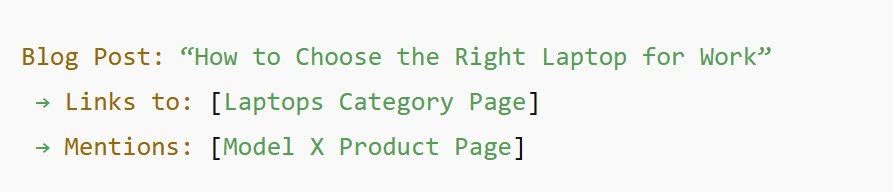
The Goal: To transform helpful advice into a direct sales path. By linking from an educational guide to a specific product or category, you’re providing a solution to a problem in real-time. For Google, these are high-quality signals that prove your store isn’t just a list of prices, but a valuable resource in your niche.
The Optimal Link Distribution for eCommerce Growth
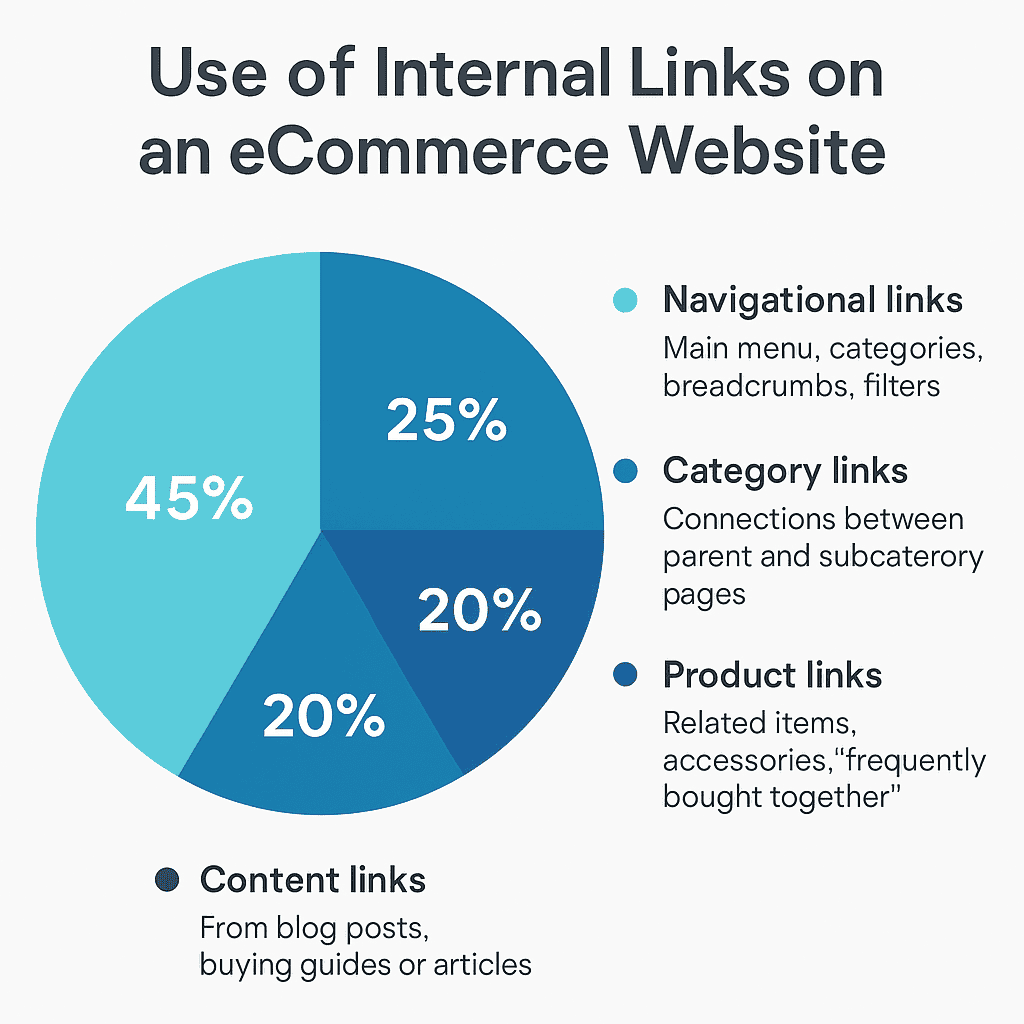
For search engines to crawl your site effectively and for “link equity” to actually boost your rankings, a high-performing eCommerce structure typically follows this strategic balance:
- Navigational links - 45% This includes your main menu, core categories, breadcrumbs, and filters. It serves as the foundation, ensuring both users and bots can move through the site without hitting dead ends.
- Category links - 25% These are the connections between parent and subcategory pages. They are essential for building a clear hierarchy and passing authority from top-level pages down to specific niches.
- Product links - 20% Links found in "related items," "frequently bought together," or accessory sections. These create a dense internal web that helps search engines discover product pages buried deep within your catalog.
- Content links - 10% Links originating from blog posts, buying guides, or FAQ articles. This is your most powerful tool for adding contextual relevance and guiding users from the research phase to the checkout.
Building a High-Performance Internal Linking Structure
This strategic balance keeps your site effortless to navigate for both shoppers and search engines. While navigational and category links build a logical hierarchy, your product and content links do the heavy lifting—boosting engagement and channeling authority directly to your key commercial pages.
To achieve this, the most effective systems follow the “Silo” or Topic Cluster principle. This approach groups related pages together, making it incredibly easy for search engines to grasp the relevance and depth of your catalog.
The Strategic Flow
Think of your link architecture as a logical, layered journey:
Homepage → Category Pages → Product Pages → Related or Complementary Items
This structure ensures that “ranking power” flows down from your high-traffic top-level pages, while simultaneously keeping users engaged within the same topic.
Core Tactics for Stronger SEO Signals
To solidify your navigation and improve visibility, focus on these two essentials:
- Breadcrumbs. These provide a clear "You are here" signal, helping both users and Google instantly map out where each page sits within your site hierarchy.
- "Related Products" or "You May Also Like" Blocks These aren't just for sales; they connect products within the same intent or category, creating a dense, crawlable web of relevant content.
Even a few strategic connections can transform your site performance. For example, a single user journey (just three clicks from the homepage to a product) can generate up to eight valuable internal links. This simple optimization significantly improves your crawlability, visibility, and overall user flow.
Technical and SEO Best Practices
Building internal links is about more than just making connections; it’s about ensuring they are clean, relevant, and technically sound. To keep your structure working for you rather than against you, focus on these core pillars:
- Natural Anchor Text
Avoid the trap of over-optimization. Your anchor text should feel natural and descriptive, giving both users and search engines a clear idea of what’s on the other side.
Pro Tip: Use conversational phrases like “see our modern kitchen cabinets” rather than repetitive, robotic strings like “buy kitchen cabinets online.”
- Maintenance and Performance Tracking
A link is only valuable if it works. Technical debt can quietly erode your SEO efforts.
Fix Broken Links: Regularly crawl your site with tools like Screaming Frog or Ahrefs to catch 404 errors. Broken links don’t just frustrate users; they waste your precious crawl budget.
Monitor with Data: Use Google Search Console to track how your internally linked pages perform. Pay close attention to link depth and identify “orphan pages” -valuable content that has no internal links pointing to it.
Avoiding Common Technical Traps
Even the best strategy can be undermined by small technical oversights:
Never use “nofollow” on important internal links. You want search engines to follow these paths and pass authority.
Keep redirects clean. Avoid 301 redirect chains. When you move a page, update the internal links to point directly to the new URL.
Audit your Canonical Tags. Be careful with product variations; if misused, canonicals can accidentally block search engines from indexing important pages.
A healthy internal linking structure should be invisible to the user but highly efficient for the crawler. When done right, it ensures that every key page on your site receives the “ranking power” it deserves and remains easily accessible to everyone.
How Content Strengthens Internal Linking
Content plays a crucial role in building a strong internal linking network. Blog posts, guides, and how-to articles can naturally lead users toward commercial pages — and help search engines understand the relationship between informational and transactional content.
Well-structured blog content can:
- Support product and category pages by linking to them within relevant topics (for example, a guide on “how to choose the right materials for home renovation” linking to specific service or product pages).
- Create content funnels that move users from awareness to purchase — each article should end with a clear CTA (call to action) like “Explore our services,” “See project examples,” or “Get a quote.”
- Reinforce topical authority by connecting multiple articles within the same theme (design, renovation, materials, etc.), forming clusters that improve both user experience and SEO.
When done strategically, content-driven internal linking not only improves rankings but also turns blog readers into potential buyers.
Mini Checklist for eCommerce Internal Linking
1. Are there links between categories?
Make sure related categories connect to each other (for example, “Kitchen” → “Appliances” → “Lighting”) to help users and search engines explore your site structure.
2. Do top products have enough internal links?
Key products should be linked from categories, home page sections, and blog content – this boosts their visibility and ranking potential.
3. Is your blog linking to commercial pages?
Every informational post should include links to relevant product or service pages, turning content readers into potential buyers.
Conclusion
Internal linking is one of the most effective and completely free ways to strengthen your website’s SEO. It doesn’t require advertising budgets or complex tools – just strategic planning and smart structure.
By connecting your pages logically, you help Google better understand your site, distribute authority to key product and category pages, and guide users smoothly toward a purchase.
For eCommerce, a strong internal linking strategy means better visibility, faster indexing, and higher conversions – all achieved with the resources you already have.
At dits.agency, we specialize in SEO for eCommerce websites – from technical optimization and link architecture to content strategy and conversion growth. If you want to boost your store’s visibility and sales – contact us today to discuss how we can help your business grow.
Also you can read:
Zero Search Results: What Your Site Visitors Are Searching For – but Not Finding
Using Local Keywords to Drive Search Traffic That Converts
How Not to Migrate a Website from WordPress to Shopify: A Real-World SEO Case Study