


Table of Contents
ToggleThis is a practical guide to product page SEO and how to get ecommerce product pages into Google’s top search results and generate consistent sales from organic traffic.
When it comes to SEO for ecommerce stores, even a relatively small amount of product page optimization can deliver significant results. Improving a few key elements can have a major impact on search visibility, organic traffic, and sales.
First, many of the fundamentals are relatively straightforward to implement. Second, in 2026, proper ecommerce product page SEO can make a significant difference to organic sales – especially if your goal is to reduce your dependence on paid advertising.
In this guide, we’ll cover:
- how to choose the right keywords for product pages;
- how to optimize the key on-page SEO elements of an ecommerce product page;
- how to write product descriptions that help pages rank while also
- helping customers make a purchase;
- image optimization that many ecommerce stores still overlook;
- advanced Product Schema and structured data that can make your products more visible in Google search results.
My name is Constantin Nacul, founder of DITS.agency, an agency specializing in ecommerce development and SEO.
Through SEO and content strategies, we’ve helped ecommerce businesses increase their organic traffic and revenue by 2x, 5x, and in some cases even 10x.
In this guide, I’ll show you the product page SEO best practices we use and how you can apply them to your own ecommerce store.
The Foundation of Product Page SEO: Keywords and Search Intent
Let’s start with the most important part of product page SEO: keywords and search intent.
Before optimizing anything on a product page, you need to understand exactly which search queries that page should rank for.
Over the years, I’ve analyzed more than 200 ecommerce stores, and one of the most common mistakes I see is choosing the wrong keywords or misunderstanding search intent.
Store owners often target keywords that are too broad or competitive. Or they try to rank a product page for a query that doesn’t match the type of page Google actually wants to show.
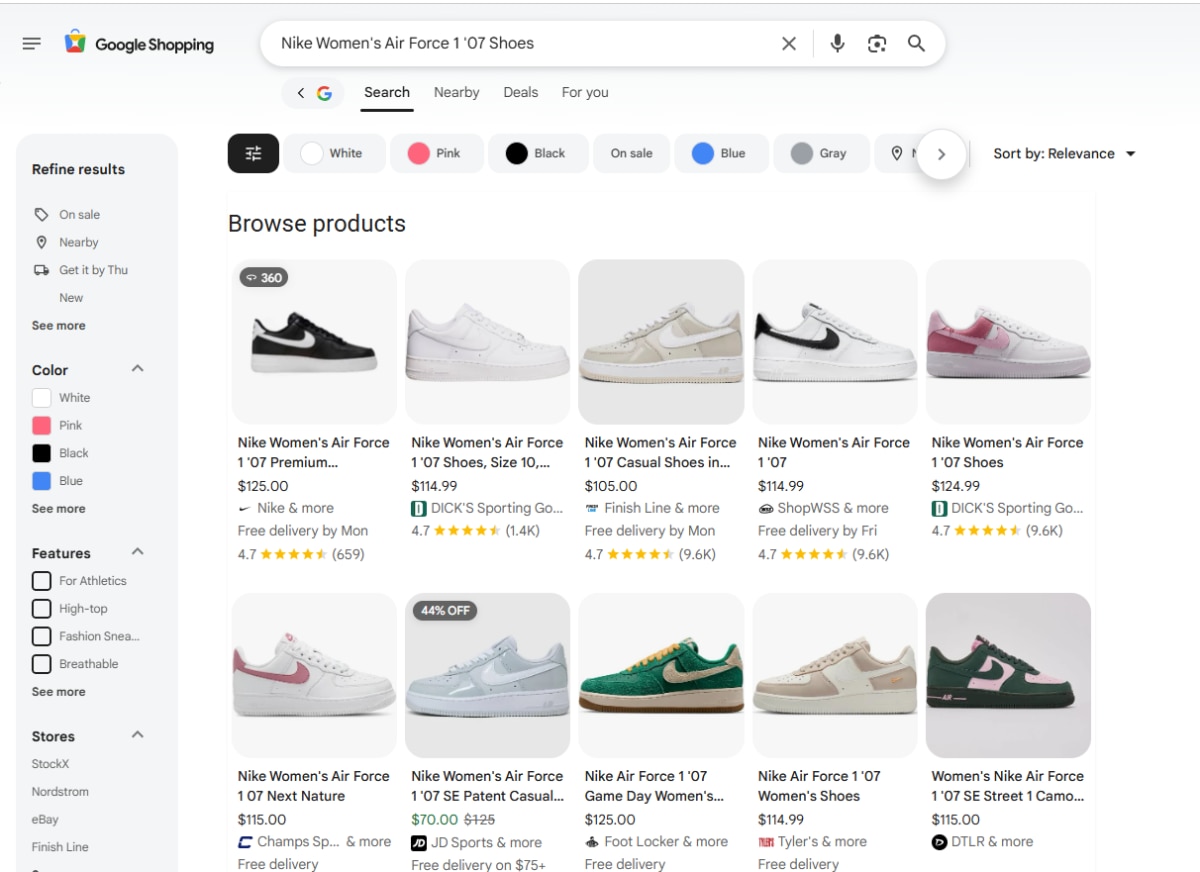
For example, you may optimize a product page for a keyword while Google predominantly shows articles, buying guides, or comparison pages for that search.
Let’s look at a simple example: coffee machines.
Search Google for:
coffee machine
and you may see a mix of informational articles, category pages, reviews, comparisons, and lists of different models.
Now make the query more specific:
automatic coffee machine
The results are likely to contain more commercial pages where users can browse and buy relevant products. This indicates stronger commercial intent.
If we had only these two keywords: coffee machine and automatic coffee machine, and two pages an informational article and a commercial category page – automatic coffee machine would generally be a better fit for the commercial page, while coffee machine could be targeted by broader informational content.
The important point is simple: don’t choose a keyword based on search volume alone. Check what type of content Google actually ranks for it.
How to Choose Keywords for Product Pages
For an individual product page, the primary keyword should be as specific as possible while accurately describing the product.
Imagine you sell shoes.
Trying to optimize an individual product page for:
sneakers
would usually be far too broad.
Even:
women’s sneakers
may be better suited to a category page than to an individual product.
A more specific query could be:
women’s white leather sneakers
Or, depending on the product, a query that includes the brand, model, intended use, material, or another important characteristic.
These more specific searches often come from users who are much closer to making a purchase.
Someone searching for sneakers could be looking for almost anything. Someone searching for a particular type, color, material, or model already has a much clearer idea of what they want.
The same logic applies to our coffee machine example:
coffee machine → broad category or informational content
automatic coffee machine → potentially a category page
Philips LatteGo 5500 automatic coffee machine → individual product page
The exact structure will, of course, depend on the products and categories in your store.
But the principle behind ecommerce product page SEO remains the same:
The more precisely a search query matches a specific product, the more likely it is to reflect strong purchase intent and be suitable for that product page.
A Product Page SEO Example From Our Experience
Here’s a simple example from one of our ecommerce SEO projects.
An online sportswear store came to us because one of its priority product groups had poor search visibility and was generating almost no organic traffic.
When we analyzed the product pages, we found a fundamental problem: the product titles and descriptions relied almost entirely on brand-specific model names. They didn’t clearly tell Google or a user unfamiliar with the model – what the products actually were.
For example, one product was named:
Venum UFC Fusion Fight Night
We changed it to:
Venum UFC Fusion Fight Night MMA Shorts
The difference looks small, but it is important. The H1 now contains a relevant product term that immediately identifies what is being sold.
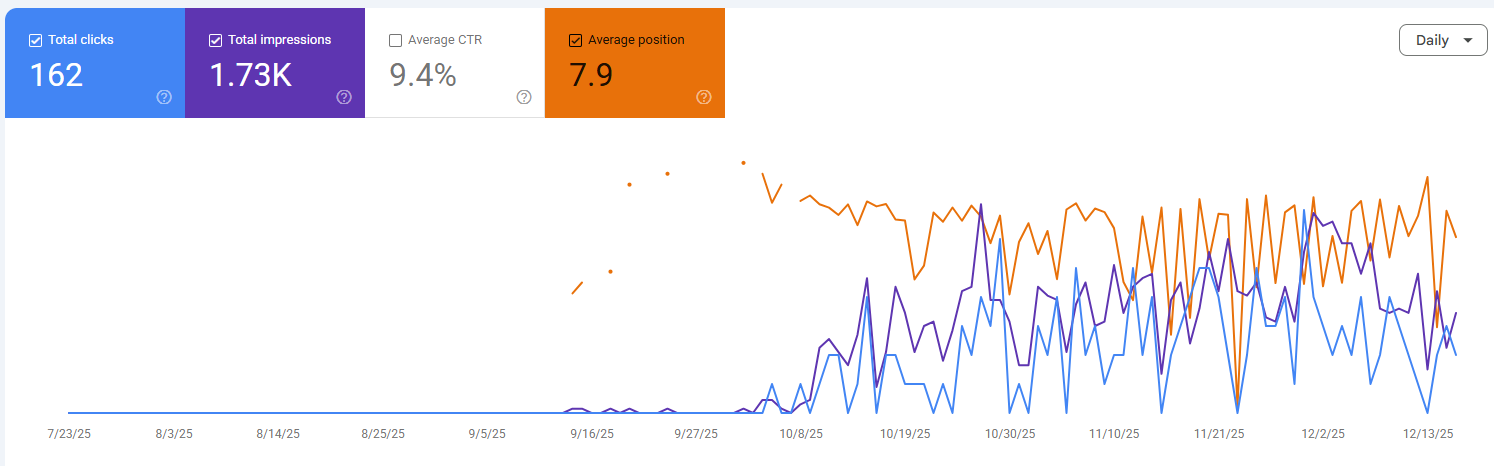
We didn’t stop at the H1. We also optimized the meta tags and product descriptions, naturally incorporated relevant keywords, improved image alt text, expanded product specifications, added customer reviews, and introduced related-product blocks to strengthen internal linking.
After Google reindexed the updated pages, we began to see positive movement in rankings and organic traffic.
The important lesson from this case is that the improvement did not come from changing one H1. It came from comprehensive product page SEO optimization, with the product title, content, metadata, images, reviews, and internal linking working together.
How to Find Keywords for Product Pages
A good place to start is by looking at the keywords your competitors’ product pages already rank for.
You can use Ahrefs, Semrush, or another SEO tool to analyze them. Pay particular attention to search queries that include product-specific attributes such as:
- color;
- size;
- material;
- product type;
- intended use;
- brand or model;
- other characteristics that influence the buying decision.
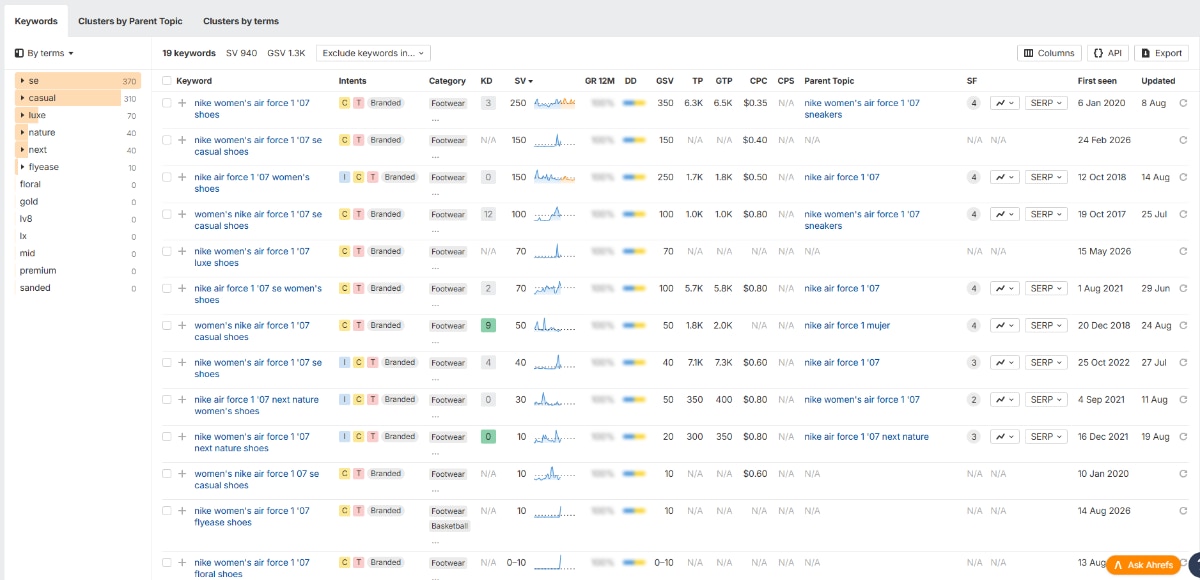
One of the simplest methods is to take the URL of a competitor’s product page, enter it into Ahrefs or Semrush, and check which keywords that specific page ranks for.
This can quickly reveal relevant queries you may have missed during your initial keyword research.
However, don’t rely on SEO tools alone.
Always check the Google search results manually for the keywords you are considering. SEO tools can misinterpret search intent or provide ranking data that doesn’t fully reflect what Google is currently showing.
Look at the actual top 10 results. Are they individual product pages, category pages, articles, buying guides, or a mixture of different page types?
If Google primarily ranks category pages for a keyword, that query may not be the best target for an individual product page. If individual products dominate the results, it is a much stronger signal that the keyword fits your product page SEO strategy.
Once you have identified relevant queries and confirmed their search intent, you can map them to the appropriate product pages and optimize those pages accordingly.
You can also read the atricle about using local keywords.
What If Your Ecommerce Store Has Hundreds or Thousands of Products?
If your store has 100, 500, or several thousand products, you probably won’t find a keyword with significant search volume for every single product.
That’s completely normal.
In these cases, optimize the page around the clearest and most accurate product name, including relevant attributes such as the brand, model, product type, material, or other important characteristics where appropriate.
Even if SEO tools show little or no search volume for the exact query, the page can still attract organic traffic and sales from highly specific long-tail searches.
At the same time, you shouldn’t necessarily invest the same amount of SEO resources into every product in your catalog.
For example, spending several hours manually optimizing a $5 product that contributes very little to your overall revenue may not be the best use of your SEO budget.
Instead, prioritize product pages based on their business potential. Products with stronger demand, higher margins, greater revenue potential, or strategic importance should generally receive more attention.
And don’t forget about category and collection pages.
If a category contains hundreds of related products and there is strong search demand around the broader category keyword, optimizing that category may generate considerably more organic traffic and revenue than trying to rank every individual product separately.
For large ecommerce stores, effective SEO is therefore not about optimizing every URL equally. It is about deciding which product pages deserve deeper optimization, which can target long-tail searches, and which queries are better served by category pages.
Where to Use Keywords on a Product Page
Once you have selected the primary keyword, the next step is to use it in the right places on the product page.
The main SEO elements to optimize are:
- Product name / H1
- URL
- Meta Title
- Meta Description
- Product description
- Image alt text
Yes, it’s a simple checklist. And that’s exactly why it is often underestimated.
When an ecommerce store has hundreds or thousands of products, this work quickly becomes repetitive. Optimizing the first five product pages is easy. Applying the same standards consistently across hundreds of priority products is where the real challenge begins.
AI, virtual assistants, templates, and automation can speed up the process, but the fundamental optimization still needs to be done.
Another important part of ecommerce product page SEO is avoiding keyword cannibalization.
Different pages should not unnecessarily compete for the same primary search query. A common mistake, particularly on large ecommerce websites, is targeting the same keyword with both a category page and an individual product page.
For example, if you have a category page for women’s white leather sneakers, it usually makes little sense to optimize several individual products around exactly the same primary query. Product pages should target more specific searches related to their brand, model, style, or other distinguishing attributes.
That is why keyword mapping is important: each major search query should have a clear target page based on search intent.
For very large catalogs, you also need to decide which product URLs should actually be indexed. Duplicate variations, parameter URLs, discontinued products, and other low-value pages may require canonicalization, redirects, or other indexation rules depending on the site structure.
Important:canonicalizing product pages to a category page should not be used simply because a store has thousands of products. If an individual product page is unique, useful, and intended to rank in search, it will generally need its own self-referencing canonical. Canonicals should primarily be used to consolidate duplicate or near-duplicate URLs.
Meta Title for Product Pages
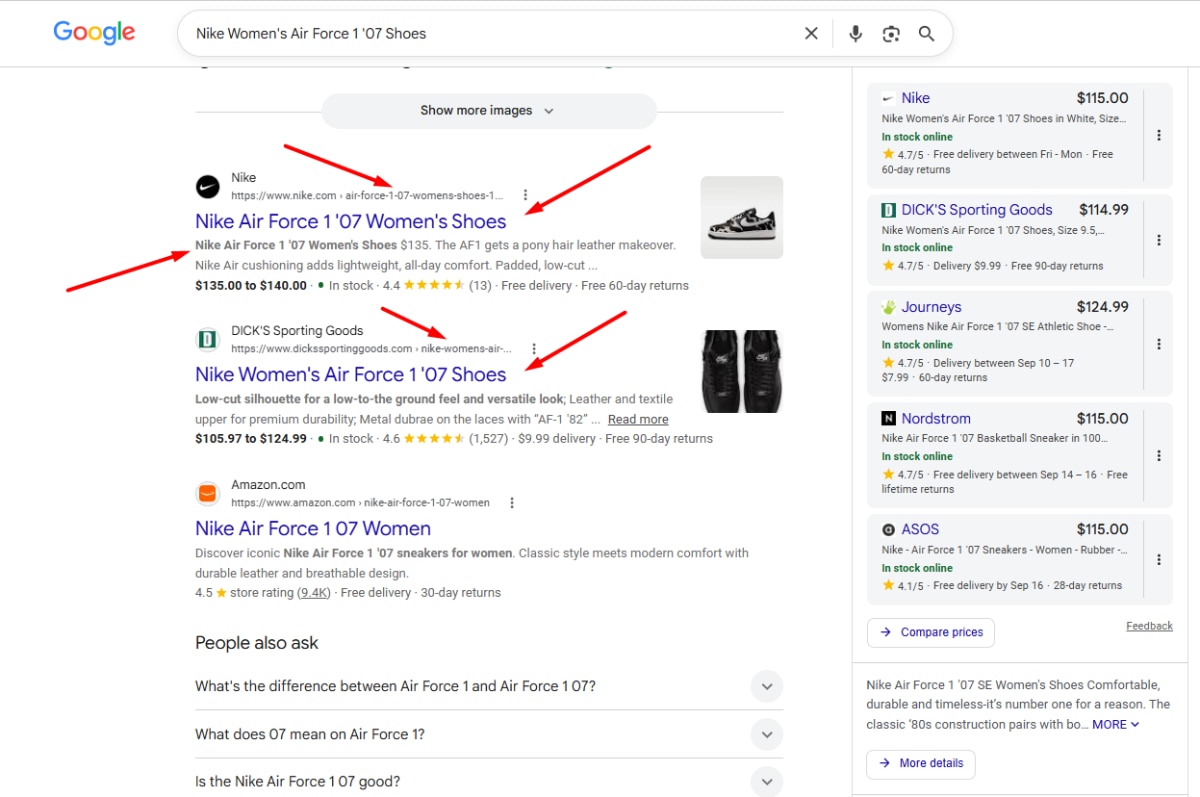
The Meta Title is one of the most important on-page elements for product page SEO optimization.
As a practical guideline, aim for a title that is concise enough to display well in search results. Around 50–60 characters is often a useful target, although Google does not enforce a fixed character limit and may rewrite or truncate titles depending on the query and device.
Place the primary keyword or the most descriptive product phrase near the beginning when it reads naturally.
For ecommerce product pages, you can also use commercial modifiers such as:
Buy, Shop, Online, Sale
—but only when they match how people actually search and make sense for the page.
Avoid unnecessary repetition. A title such as:
Buy Women’s White Sneakers | White Sneakers Online | Sneaker Shop
adds little value and looks overoptimized.
A cleaner structure would be:
Women’s White Leather Sneakers | Product/Store Name
It is also useful to maintain a consistent Meta Title structure across the store. Templates can make this much easier for large catalogs.
For smaller or lesser-known stores, including the store name in every product title is not always necessary. If title space is limited, it may be more valuable to use it for the product name, brand, model, or another attribute people actually search for.
Meta Description for Product Pages
The Meta Description is not a direct Google ranking factor, but it can influence how attractive your search result is to potential customers.
A good description tells users what the product is and gives them a reason to click your result instead of another one.
As a practical guideline, keep Meta Descriptions concise often around 130–160 characters – while focusing more on usefulness than an exact character count.
Include the primary product term naturally and highlight information that can influence the purchase decision, such as:
Free Shipping, In Stock, Warranty, Easy Returns, Shop Online
You can also include an appropriate call to action such as Shop Now or Buy Online.
For example:
Shop Venum UFC Fusion Fight Night MMA Shorts. Lightweight performance design, multiple sizes available and fast delivery. Order online today.
The goal is not simply to insert a keyword. The goal is to make your result more relevant and compelling when it appears alongside competing products in Google.
SEO-Friendly URLs for Product Pages
The product page URL should be short, descriptive, and easy to understand.
Where appropriate, include the primary product term in the URL slug.
For example, Shopify product URLs typically follow this structure:
/products/venum-ufc-fusion-fight-night-mma-shorts
Use hyphens to separate words and avoid unnecessary:
- numbers;
- special characters;
- underscores;
- capital letters;
- repeated keyword variations.
A good product URL should give both users and search engines a clear indication of what the page contains.
At the same time, don’t change an existing product URL just to add a keyword if the page is already established and performing well. Changing URLs creates additional SEO considerations, including redirects, internal links, canonicals, and potentially external backlinks. For existing ecommerce stores, the potential SEO benefit should justify the change.
H1 – Product Name
The product name should include the primary keyword or the clearest description of the product, but it must still sound natural.
Avoid turning the H1 into a list of keyword variations.
For example:
Bad:
Women’s Sneakers | White Sneakers | Leather Shoes | Women’s Casual Shoes
Better:
Women’s White Leather Sneakers
Each product page should have a clear primary H1. The rest of the content can then be organized with H2 and H3 headings.
The goal is simple: both the customer and Google should immediately understand what the product is.
Product Page Content Structure
A well-optimized product page should contain more than an image, a price, an Add to Cart button, and two sentences of description.
A useful structure can include:
- H2 and H3 headings for important sections;
- lists for specifications and technical details;
- product benefits and key features;
- information about what is included;
- sizing, dimensions, materials, or compatibility where relevant;
- FAQs;
- customer reviews;
- related and complementary products.
The exact structure will depend on what you sell. A laptop, a sofa, a pair of running shoes, and a replacement car part obviously require different information.
The important principle is to provide enough information for a customer to understand the product and make a purchasing decision.
FAQs can be particularly useful here. Potential customers almost always have questions before buying. If an important answer is missing, they may not contact your support team to ask for it. They may simply return to Google and choose another store that provides the information immediately.
This is why good product page SEO and conversion optimization often overlap: useful content helps search engines understand the page while removing doubts that can prevent customers from buying.
Breadcrumbs
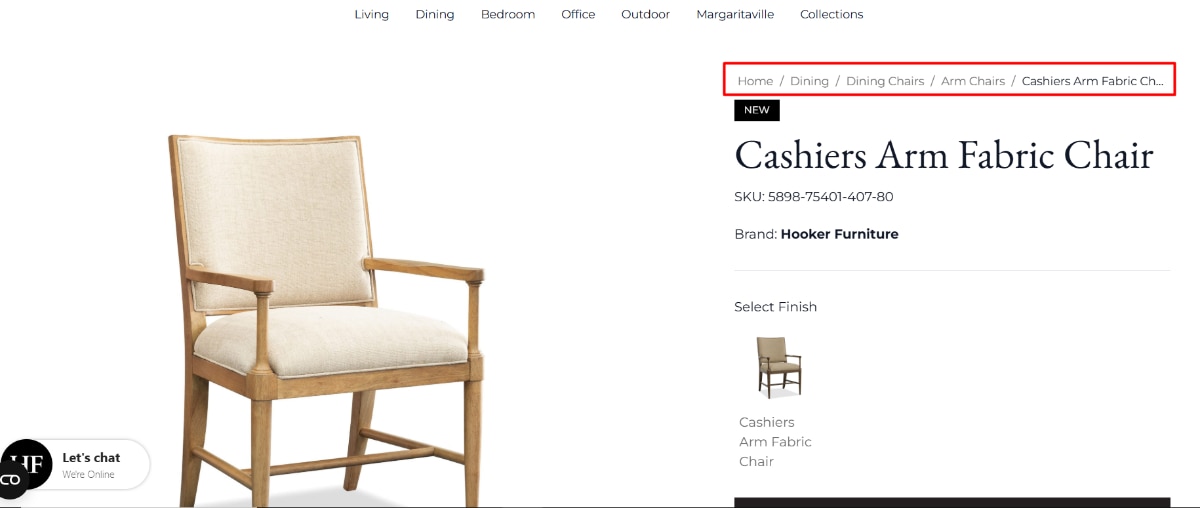
Breadcrumbs should show a clear path through your ecommerce website.
For example:
Home/Dining/Dining Chairs/Arm Chairs/Cashiers Arm Fabric Chair
They make it easier for customers to understand where they are in the store and navigate back to the relevant category.
Breadcrumbs also help search engines understand the hierarchy and relationships between your ecommerce pages.
For product pages, you can additionally implement BreadcrumbList structured data so that search engines can interpret this navigation structure more clearly.
How to Write SEO-Friendly Product Descriptions
Each important product page should have a useful description written for that specific product.
If you run a dropshipping store or resell products from manufacturers, avoid simply copying the manufacturer’s description across your website.
Instead, create your own content based on the information customers actually need to make a decision. This also gives you an opportunity to target relevant search terms naturally and differentiate your page from other stores selling exactly the same product.
There is no ideal word count for a product description.
For some products, 200 words may be enough. Others may genuinely require 300, 500, or considerably more because customers need specifications, compatibility information, instructions, dimensions, materials, or other details.
The same applies to keywords. You do not need to use the primary keyword an exact number of times.
Include the main product term naturally, particularly where it helps identify the product, and use related terms, attributes, specifications, and synonyms where they are useful.
The description should always be written for the customer first, rather than around a predetermined keyword density.
What Should Appear Above the Fold?
The most important purchasing information should be immediately accessible without forcing the customer to search through the page.
Depending on the product, this may include:
- product name;
- rating and number of reviews;
- price and any current discount;
- product variations;
- size options or size guide;
- availability;
- delivery information;
- key specifications and benefits;
- a clear Add to Cart or Buy button.
More detailed information can appear further down the page: extended descriptions, specifications, additional images, FAQs, reviews, delivery and returns information, and related products.
This structure gives customers the essential information first while still allowing you to build a comprehensive page for users who need more detail before purchasing.
FAQ on Product Pages
A product FAQ can be placed below the main product information, often in an accordion format so that it does not make the page unnecessarily long.
The questions should come from real customer concerns, rather than being added simply to create more SEO content.
Depending on the product, they might cover:
- how the product is used;
- available sizes, colors, or versions;
- compatibility;
- materials and dimensions;
- delivery and returns;
- warranty;
- care instructions;
- what is included in the package.
FAQ answers also provide a natural place to use secondary and semantically related search terms where they genuinely help answer the question.
This allows you to expand the useful content of a product page without overwhelming customers with a large block of text.
What to Avoid in Product Descriptions
Avoid writing huge walls of text. Ecommerce visitors usually scan a page before deciding which sections they want to read, so descriptions should be easy to navigate.
Also avoid keyword stuffing. If the same phrase appears unnaturally again and again, rewrite the copy. A simple test is to read the description aloud — repeated or forced keywords become very obvious.
Another common mistake is using exactly the same description across dozens or hundreds of products.
That doesn’t mean every sentence must always be completely unique.
For very similar products, a common template can be perfectly practical. For example, if a store sells the same cap design for different football teams, part of the description may remain consistent while the team, colors, design details, and other relevant attributes change.
But the description of a cap and the description of a hoodie should obviously provide substantially different information.
The objective is not to create “unique text” simply for SEO. It is to make each important product page useful, accurate, and specific to the product being sold.
Example of a Well-Structured Product Page: JYSK
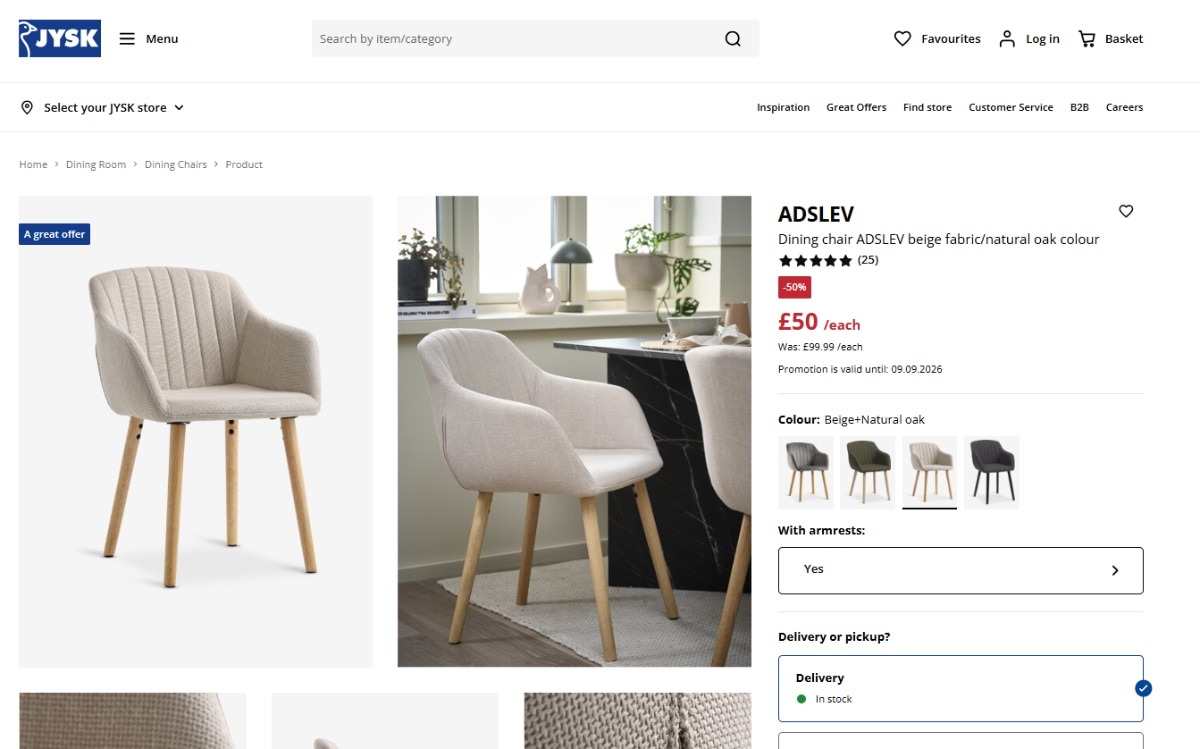
A useful real-world example is the product page structure used by JYSK.
Their product pages combine concise product information with many of the elements that are useful for both ecommerce SEO and conversion.
A customer can find information such as product images, pricing and discounts, reviews, available variations, specifications, delivery information, warranty details, and assembly instructions. The page also provides additional product recommendations that support upselling, cross-selling, and internal navigation.
This is a good example of an important principle behind ecommerce product page SEO:
A strong product page should not be built for Google separately from the customer. The best pages help search engines understand the product while giving customers the information they need to confidently make a purchase.
Product Image SEO
Images are another important part of product page SEO.
Image optimization affects not only how search engines understand your product pages, but also how quickly those pages load. This is especially important for ecommerce websites, where a single product page may contain a large gallery of high-resolution images.
For product photography, WebP is usually a good choice because it provides high image quality at relatively small file sizes. JPEG can also be used for photographs.
For images containing text or graphics, WebP or PNG may be more appropriate, while SVG is generally a good format for logos, icons, and interface elements.
The goal is simple: maintain the image quality customers need while keeping file sizes as small as reasonably possible.
Compress and Resize Product Images
Large image files can often be compressed significantly without any noticeable loss of quality.
There is also little reason to upload a 2,000-pixel-wide product image if it is only displayed in a 400-pixel-wide container.
Images should be sized appropriately for how and where they are displayed. At the same time, remember that modern websites need to support different screen sizes and pixel densities, so responsive images can be used to serve appropriate versions depending on the user’s device.
This is particularly important on mobile, where unnecessarily large images can consume bandwidth and slow down the page.
Optimize Image Alt Text
Every important product image should have descriptive alt text where appropriate.
Alt text should explain what is actually shown in the image and can naturally include relevant product attributes such as:
- product type;
- brand or model;
- color;
- material;
- style;
- size or variation, when relevant.
For example, instead of:
alt=”shoes product image”
you could use:
alt=”women’s white leather sneakers side view”
Avoid stuffing multiple keyword variations into alt attributes. Alt text should remain short,descriptive, and useful.And remember that alt text is not only an SEO element. Its primary purpose is also accessibility, helping users who rely on screen readers understand meaningful images on the page.

Use Lazy Loading Correctly
Images that appear far below the initial viewport do not necessarily need to load immediately.
This is where lazy loading can help.
For example, additional product photos, images below customer reviews, or visuals in related-product sections can often be loaded as the visitor approaches them.
This reduces the amount of content that needs to load initially and can improve page performance and the overall user experience.
However, be careful with the main product image or other important above-the-fold content. These images should generally be available immediately rather than delayed through lazy loading.
Product Schema Markup and Google Rich Results
The final major element of ecommerce product page SEO is structured data, commonly referred to as Schema Markup.
Structured data gives search engines machine-readable information about your product and its commercial details
When implemented correctly, product structured data can make a page eligible for richer appearances in Google Search, potentially displaying information such as:
- price;
- availability;
- ratings;
- reviews;
- product information and images.
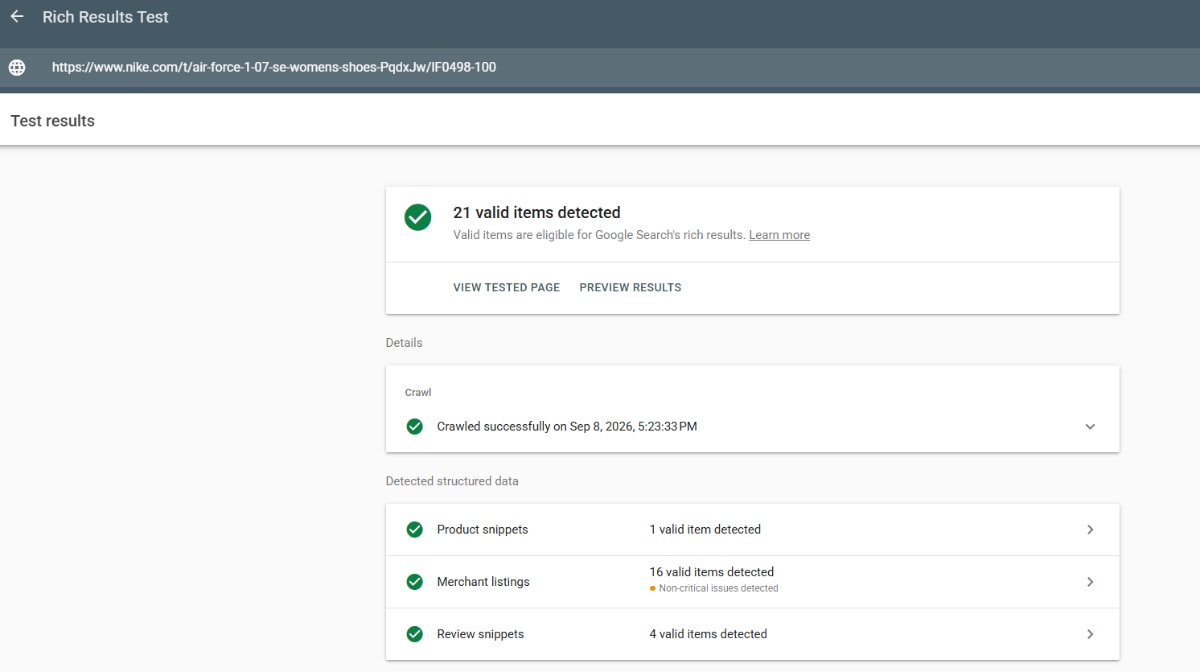
At a minimum, ecommerce stores should check whether their product structured data is implemented correctly and whether important product information is actually being passed to Google.
Depending on the page and implementation, important Schema properties and types can include:
- Product
- Offer
- AggregateRating
- Review
- BreadcrumbList
Product structured data can contain information such as the product name, brand, description, images, SKU and other identifiers, while Offer data can provide details such as price, currency, availability, and the offer URL.
One important point: Schema Markup should reflect information that is actually present and accurate on the product page. It should not be used to provide Google with ratings, prices, availability, or other information that users cannot verify on the page itself.
https://search.google.com/test/rich-results/
Common Product Schema Problems
Some of the issues we regularly check during product page SEO optimization include:
- missing or incorrect prices;
- incorrect availability status;
- missing or incorrectly implemented ratings and reviews;
- Breadcrumb Schema errors;
- missing or incorrect product identifiers;
- incomplete Offer data;
- structured data that does not match the visible product information.
After implementation, always test your structured data.
One of the easiest ways to do this is with Google Rich Results Test.
If the tool cannot detect the expected product structured data or reports errors, investigate the implementation rather than assuming the markup is working correctly.
Correct Schema Markup does not guarantee that Google will display a rich result. However, it can make your product pages eligible for enhanced search appearances, which can make listings more informative and potentially improve click-through rates.
Product Page SEO Checklist: What to Do and What to Avoid
At this point, the fundamentals of how to optimize an ecommerce product page for SEO can be summarized in a relatively simple checklist.
What You Should Do
- Create useful content for your most important product pages.
- Match each product page with the right keywords and search intent.
- Use clear H1, H2, and H3 headings.
- Add useful specifications, features, and product details.
- Collect and display genuine customer reviews.
- Optimize product images, file sizes, and alt text.
- Build logical internal links between products and categories.
- Implement and validate Product Schema and other relevant structured data.
- Monitor rankings, clicks, impressions, and organic performance using Google Search
- Console, Ahrefs, Semrush, or other SEO tools.
- Clearly distribute target keywords between product pages, categories, and informational content.
What You Should Avoid
- Copying manufacturer descriptions without adding useful original information.
- Stuffing product descriptions, headings, or alt text with keywords.
- Using identical Meta Titles and Meta Descriptions across multiple products.
- Repeating the same generic content across large parts of the catalog.
- Creating unnecessary indexable URLs for product variations.
- Making multiple pages compete for the same primary keyword.
- Ignoring mobile usability and page performance.
- Uploading unnecessarily large, unoptimized product images.
These are the core product page SEO best practices for 2026. None of them is particularly complicated on its own. The challenge is applying them consistently across the products that matter most to your ecommerce business.
And this brings us back to the principle we started with: you don’t necessarily need to optimize every product in your catalog with the same level of effort. Start with the pages that have the strongest potential to generate organic traffic and revenue, optimize them properly, measure the results, and then expand the process across the rest of the store.
If your ecommerce business is just starting with SEO or your product pages are indexed but not generating the rankings, traffic, and sales you expect DITS.agency can audit your store, identify the biggest SEO opportunities, and build a product page optimization strategy around your catalog and business priorities.